










The 7 steps for a successful agency onboarding process in 2026
 Vivienne ChenMar 14, 2026
Structure your agency onboarding with Assembly
Assembly gives you the tools to manage contracts, intake forms, billing, portal access, and communication in one branded client portal. Start onboarding clients with more clarity and consistency. Start your free trial today.
4.9 rating
I’ve looked at hundreds of agency onboarding workflows, and one pattern keeps showing up. Agencies that treat onboarding as a structured process tend to build smoother client relationships from the start. In this guide, I’ll walk through each step, along with practical tips and the mistakes I’ve seen teams repeat in 2026.
What is agency onboarding?
Agency onboarding is the step-by-step process that moves a client from a signed contract to a project kickoff. It usually includes sending intake forms, setting up invoicing, granting portal access, and scheduling initial meetings.
The goal is to get both sides aligned on timelines, deliverables, and expectations before any real work begins. I’ve seen how a clear onboarding process reduces confusion early and sets a professional tone for the relationship.
Why strong agency onboarding is important
Agency onboarding is important because it's your first real chance to show clients how you operate. That initial experience influences retention, referrals, and project outcomes. Clients often judge your professionalism based on how smoothly you transition them from a signed contract to an active project.
I've seen agencies lose clients before the work even begins because their onboarding felt chaotic. Scattered email threads, delayed contract signatures, unclear next steps, or missing payment information might signal a lack of coordination. Even if you're brilliant at the actual work, a messy onboarding can create doubt before you've had a chance to prove yourself.
Here's what a strong onboarding process does for your agency:
- Sets clear expectations upfront: Clients learn how you communicate, how organized you are, and whether you respect their time.
- Increases client retention: In a study by Userpilot, over 74% of potential customers said they would switch to a different solution if the onboarding process felt complicated. The research focused on SaaS companies, but it highlights a broader pattern. When the first experience feels confusing or disorganized, it can make clients question their decision.
- Saves time for both sides: Clear processes mean fewer "just checking in" emails, fewer missed steps, and less back-and-forth. You spend less time chasing signatures or payment details and more time focusing on the work you were hired for.
- Differentiates you from competitors: I've analyzed dozens of agency onboarding processes and most rely on generic templates and manual workflows. A structured, professional experience signals that you run a more capable and organized operation.
The 7 steps for a successful agency onboarding process in 2026
Agency onboarding processes will vary depending on your services, client type, and team size. However, I’ve found the core steps tend to stay consistent across well-run teams.
I used a client portal platform called Assembly to test out these agency onboarding steps. It lets you create the workflow once and reuse it for every client, which saves hours compared to manual setup each time.
Here are the 7 steps to guide you:
1. Send and sign the contract
The contract protects both parties and sets clear terms for the relationship. It outlines scope, deliverables, timelines, payment terms, and what happens if something changes mid-project.
I recommend sending a welcome email along with the contract to set a positive tone and outline what comes next. This email can introduce your team, explain the onboarding process, and give clients a clear picture of the timeline ahead.
Client onboarding tools can make this step easier. Instead of printing, signing, scanning, and emailing back PDFs, clients can review and sign contracts digitally. For example, platforms like Assembly provide a client portal that enables clients to review, sign, and store contracts conveniently in one place.
2. Collect client information through intake forms
Once the contract is signed, you need information from the client to start work. Ask your clients for:
- Project goals and objectives: What they want to achieve and how they'll measure success
- Brand guidelines and assets: Logos, color codes, fonts, and existing materials you'll need
- Access credentials: Logins for platforms, tools, or accounts you'll be working with
- Key contacts and decision-makers: Who approves work and who provides feedback
- Timelines and deadlines: When they need deliverables and any critical dates
I've found that intake forms standardize what you collect and cut down on email back-and-forth. When you rely on email for intake, responses tend to get buried or delayed. A structured form lets clients respond on their own time.
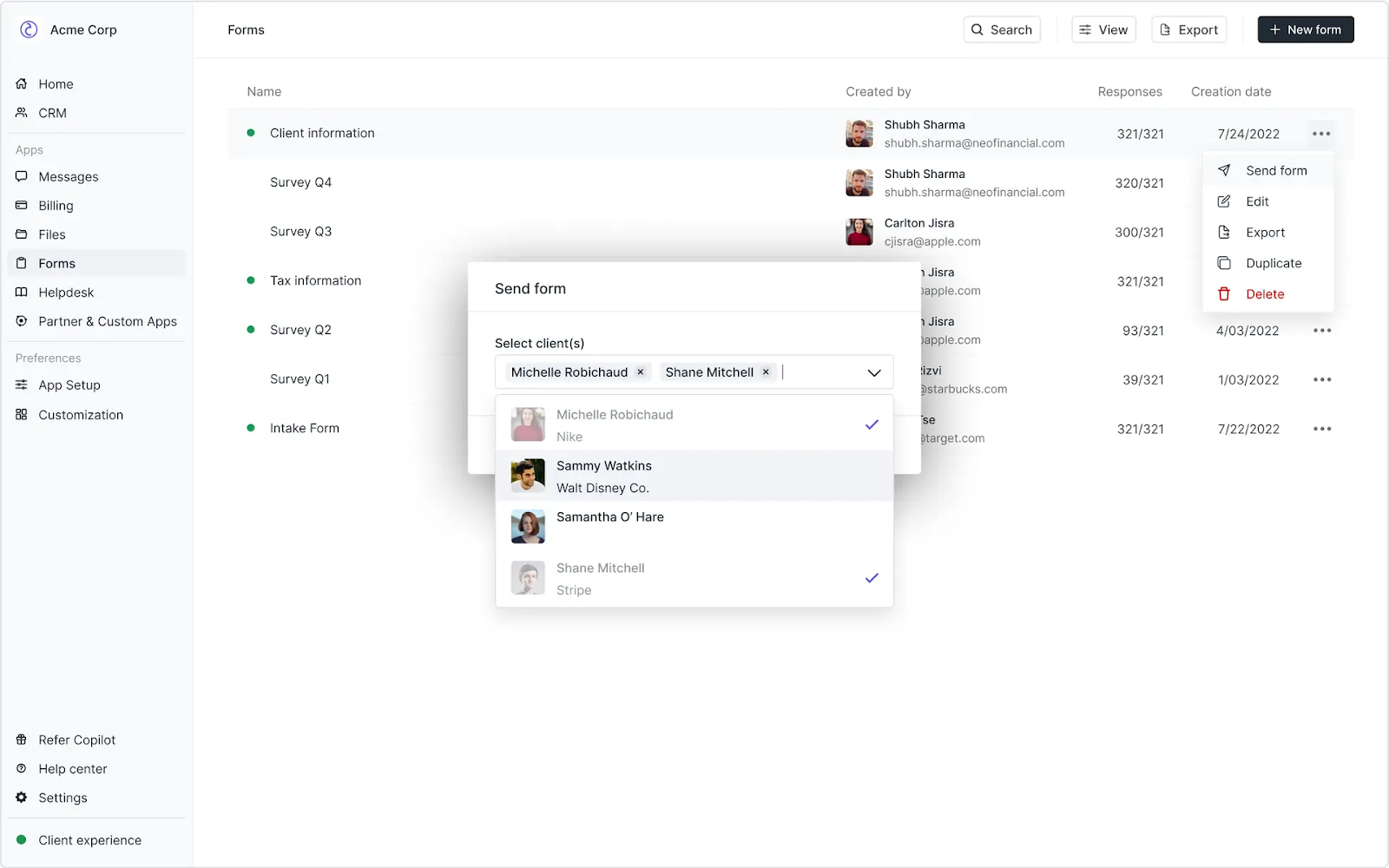
Assembly's Forms App, seen below, lets you create custom intake forms and send them directly through the client portal. Clients submit responses on their own schedule, and you can reference their answers throughout the project without digging through old emails.
Tip: Ask specific questions upfront. The more precise your questions about deliverables, timelines, and preferences, the less follow-up you'll need later.
3. Set up billing and send the first invoice
Before you start work, it’s a good idea to establish when and how you'll get paid. This means sending the first invoice, setting up payment terms, and clearly outlining what to expect for future billing cycles.
Agencies typically structure the first invoice in one of the following ways:
- Full project payment upfront: Common for smaller projects or new client relationships
- Deposit or retainer: Typically 25–50% of the total project cost to confirm the project and reserve time
- First month of recurring billing: For ongoing retainer or subscription-based services
- Milestone-based payment: First payment tied to project kickoff or initial deliverables
I recommend making the payment process as straightforward as possible. The more steps between invoice and payment, the longer you'll wait to get paid.
Platforms like Assembly simplify this by letting clients pay invoices directly through their portal without juggling multiple payment links or systems. Clients can view balances, pay bills, and track payment history in one place.
4. Grant portal and tool access
Clients need access to the tools you use to manage the work. This includes your project management system, communication channels, file storage, and any client portal where they track progress and view deliverables.
The specific tools depend on your services. For example, design agencies might grant access to Figma or InVision for feedback, and marketing agencies might add clients to Asana or ClickUp to track campaign tasks.
I've found that keeping tool access minimal works better than overwhelming clients with multiple logins. When clients have to remember which tool holds which information, they might stop checking altogether.
5. Schedule and run the kickoff meeting
The kickoff meeting aligns everyone on goals, timelines, deliverables, and how you'll work together. During this meeting, you introduce your team, walk through the project plan, and answer questions.
From what I’ve seen across agency onboarding workflows, these topics consistently come up:
- What success looks like: The specific outcomes and deliverables you’re working toward as a team
- Who does what: Responsibilities on both sides and who approves work
- Communication cadence: How often you'll check in and through which channels
- What the client needs to provide: Assets, feedback, approvals, and expected timelines
After the meeting, send a summary email that recaps what you discussed and lists immediate action items for both sides. This keeps everyone accountable and gives the client a clear record of next steps.
6. Gather project requirements and assets
Before you can start delivering work, you need the right information and assets. This includes existing content, brand assets, account access, reference materials, and any previous work the client wants you to build on.
I've learned that being specific about what you need saves time. Asking for "brand assets" might get you a random folder of files. Asking for "your logo in SVG format, brand colors in hex codes, and approved fonts" gets you exactly what you need to start.
Tip: Set deadlines for when you need these materials. If the client delays providing assets, the project timeline shifts. Setting this expectation early reduces confusion and keeps the timeline realistic.
7. Establish communication channels and workflows
The final step focuses on how you'll communicate and collaborate throughout the project. This includes deciding where conversations happen, how quickly you'll respond, when you'll share updates, and how the client provides feedback.
I recommend documenting your communication workflow in a place the client can easily reference. Specify which channel to use for urgent requests versus general questions, typical approval turnaround times, and when clients can expect progress updates.
Tip: You can include this information in your standard contracts so future clients understand the process from the start.
Best practices for agency onboarding
The 7 steps above handle the essential onboarding tasks successfully, but these practices make the process more consistent and easier to manage as you grow. Here are the adjustments that have the biggest impact:
- Create a standardized onboarding checklist: I recommend using the same process for every client so nothing gets missed. A checklist keeps your team consistent and helps new team members onboard clients without constant supervision. You can adapt the checklist for different service types, but the core steps should remain the same.
- Set clear timelines and deadlines: Tell clients exactly when they'll receive deliverables, when you need their input, and how long approvals typically take. Vague timelines create unrealistic expectations. Specific dates and turnaround times keep everyone aligned.
- Automate repetitive tasks: Use tools to handle contract sending, invoice generation, form collection, and portal setup through defined workflows. This reduces manual coordination and keeps onboarding consistent. Platforms like Assembly support these automation steps inside a branded client portal with built-in apps and automation features.
- Assign a dedicated point of contact: Clients should know exactly who to reach out to with questions or concerns. Having one main contact prevents confusion and ensures nothing slips through the cracks when multiple team members are involved.
- Document your processes: I've found that writing down your onboarding workflow, communication preferences, and approval processes reduces repetitive questions. Clients appreciate having something to reference without needing repeated clarification.
- Ask for feedback after onboarding: Once you've completed onboarding and started project work, ask clients how the experience felt. Their answers will show you where your process works and where it needs improvement.
Common mistakes to avoid in agency onboarding
Even agencies with structured processes make mistakes that can strain the client relationship early on. Here are some of the common pitfalls that can weaken onboarding:
- Overwhelming clients with too much information upfront: Dumping every policy, process document, and resource link in the first email creates decision paralysis. Clients don't know where to start or what matters most. Break information into digestible chunks and share it when it's relevant.
- Skipping the contract or rushing through it: Some agencies start work before the contract is signed to show goodwill or meet tight deadlines. This creates legal risk and scope confusion. Even if the client seems eager, wait for the signed contract before delivering substantial work.
- Making assumptions about client knowledge: Just because a client hired you doesn't mean they understand your process, tools, or terminology. Explaining how things work without being condescending prevents confusion later. If you're using project management software or technical platforms, walk them through it.
- Not collecting everything you need upfront: Chasing clients for missing assets, access credentials, or information weeks into a project slows momentum. I recommend being thorough during steps 2 and 6 of onboarding. If you need something to deliver the work, collect it before you begin.
- Ignoring red flags during onboarding: If a client is unresponsive, combative about terms, or refuses to provide necessary information during onboarding, those issues often continue into project delivery. Pay attention to how clients behave before you fully commit to the engagement.
Want to simplify and automate onboarding? Try Assembly
Agency onboarding works best when you have the right structure behind the scenes. When contracts, intake forms, billing, communication, and portal access all live in one system, onboarding becomes easier to manage and more consistent for every client.
Assembly is a client portal software tool that includes a core CRM, project management, messaging, and file sharing. Service businesses use it to create a branded space where clients access project updates, documents, and communication in one place.
Here’s what you can do with Assembly:
- Embed a custom dashboard or analytics platform: Assembly lets you embed custom-built dashboards from Looker Studio, Databox, and any major service provider that offers embedding, as well as create custom dashboard apps specific to your business.
- Track client details and activity: Manage client records, communication history, and relationship data in a structured CRM that keeps everything organized in one place.
- Give clients a branded portal: Clients log into a space that reflects your brand to access contracts, invoices, files, and project updates without email back-and-forth.
- Keep tasks, messages, and files together: Client communication, shared files, and project tasks stay connected to each client record instead of being scattered across separate tools.
- Prep faster for meetings: The AI Assistant summarizes recent client activity and communication, helping you walk into calls with a clear picture of what’s been discussed and what’s outstanding.
- Stay ahead of clients: Highlight patterns that may show churn risk or upsell potential, making outreach more timely and relevant.
- Cut down on admin: Automate repetitive jobs like reminders, status updates, or follow-up drafts that used to take hours. The Assistant handles the busywork so your team can focus on clients.
Ready to create a more structured and professional agency onboarding experience? Start your free Assembly trial today.
Frequently asked questions
What should be included in an agency onboarding checklist?
An agency onboarding checklist should include the seven steps of contract signing, client intake forms, payment setup, portal access, kickoff meeting scheduling, asset collection, and communication channel establishment. These items move clients from a signed agreement to an active project systematically. Your checklist can expand based on your services, but these core items apply to most agencies.
How do you onboard multiple clients at the same time?
You onboard multiple clients simultaneously by using standardized processes, automation tools, and clear timelines for each client. Assign each client a dedicated point person to prevent confusion and ensure nothing gets missed. Stagger kickoff meetings across different days so your team isn't overloaded.
What's the difference between agency onboarding and client onboarding?
Agency onboarding and client onboarding refer to the same process of integrating new clients into your service business. The terms are interchangeable, though "agency onboarding" typically refers to creative, marketing, or professional service firms, while "client onboarding" applies more broadly to any service business.
When should you start onboarding a new client?
You should start onboarding a new client as soon as the contract is fully executed. Once all parties have signed, proceed to intake forms, billing setup, and portal access. Don't deliver any substantial work or request sensitive information until the contract is complete.
How do you handle clients who don't complete onboarding steps?
You handle incomplete onboarding by sending reminders, setting clear deadlines, and pausing project work until requirements are met. Explain that missing information or signatures delay the entire timeline and affect deliverable dates. If a client consistently ignores onboarding tasks, consider whether the engagement is worth continuing.
Your clients deserve better.
Try for free for 14 days, no credit card required.